01 — Cursor: The Preferred Tool for Full-Stack Development
In recent years, Cursor has become a standout tool among individual developers.
Core Logic:
Cursor is not a traditional code editor; it is an intelligent IDE that is “codebase aware”. Its primary function is indexing. It ingests all the files in your project and builds a local index.
So when you ask it for a requirement, it doesn’t just look at a single line of code but considers the entire project.
Key Features:
- Composer Mode (Core Highlight): This feature acts like a “super assistant.” You simply input a requirement (e.g., “help me refactor the logic of this user module”), and it automatically opens multiple files, plans the modification path, and even runs terminal commands to check for errors. You just need to review and click “Accept” to execute.
- Context-Aware Autocompletion: As you type, it provides the most reasonable suggestions based on the variable names and underlying logic of your entire project.
Pros and Cons:
✅ Pros: Excellent logical understanding and cross-file modification capabilities. Easy to use with minimal configuration.
❌ Cons: High memory consumption. As an Electron-based editor, it requires decent computer specifications; some advanced features require a monthly subscription.
02 — Claude Code: The Must-Have Reasoning Engine for Terminal Lovers
If you are a heavy Linux user (Terminal Lover), Claude Code is an essential tool for you.
Core Logic:
Claude Code is a pure command-line (CLI) tool. It has no graphical interface and no pop-ups. Its core logic operates your file system directly via terminal commands using Anthropic’s top reasoning models (Sonnet/Opus).
Key Features:
- Fully Automated Bug Fixing: You give it a task (e.g., “help me fix this test error”), and it will write code, run tests, check error logs, modify code, and run tests again until everything passes. This process is fully automated, allowing you to take a break while it works.
- Precise Diff Output: All modifications are in standard git diff format, which aligns well with engineers’ thinking and does not pollute other files in the repository.
Pros and Cons:
✅ Pros: Top-tier logical reasoning ability, often providing more robust solutions for complex algorithms and architectural refactoring than one might conceive.
❌ Cons: High entry barrier. You need to be very familiar with terminal operations; API usage is billed, which can become costly with high usage.
03 — GitHub Copilot: The Safety Foundation for Large Enterprises
Copilot remains the most widely installed tool, but its core advantage is no longer about “whose AI is smarter” but rather about “who understands how to collaborate with IDEs better.”
Core Logic:
The latest version of Copilot is based on the integration of Copilot Chat + Workspace. It excels at providing subtle assistance.
Key Features:
- Context-Aware Inline Suggestions: Your editor (VS Code or JetBrains) serves as the environment. With a shortcut key, it can provide direct modification suggestions based on the currently opened codebase.
- Enterprise-Level Security Compliance: Why do large companies (like Alibaba, Tencent, ByteDance) prefer Copilot? Because it excels at code data isolation. Your code will not feed public models, and compliance auditing is top-notch.
Pros and Cons:
✅ Pros: Unmatched compatibility. No need to switch editors, making it easy for teams to adopt. Very fast at handling simple unit tests and boilerplate code.
❌ Cons: When faced with multi-file refactoring (major surgery), it acts more like an “advanced autocompletion tool” rather than a “refactoring assistant.”
04 — Comparison Overview: How to Choose?
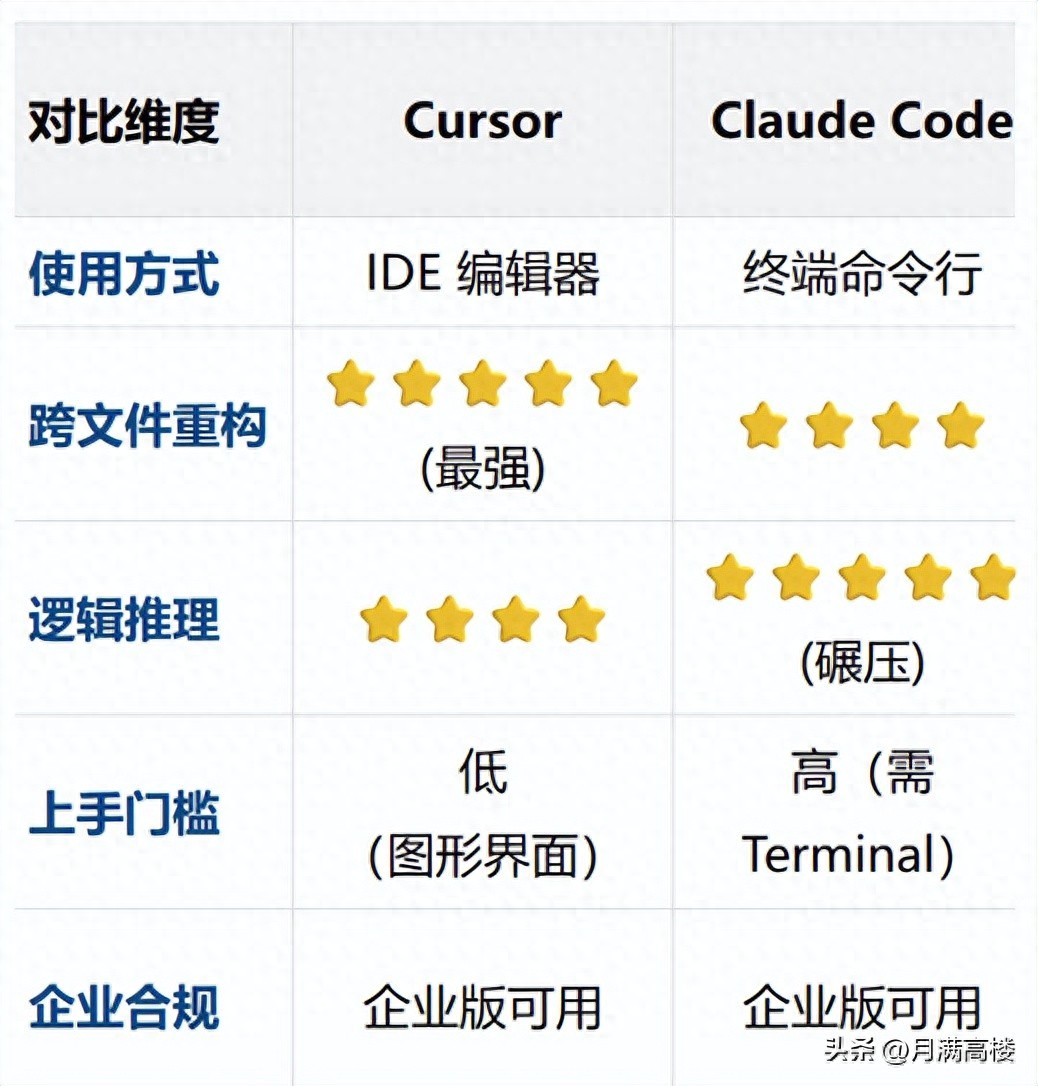
Here’s a straightforward comparison to help you choose based on your specific scenario:
05 — Practical Strategies
The era of AI tools is no longer about “choosing one”; the best strategy is to use a combination based on needs:
- Rapid Prototyping / Full-Stack Development: Primarily use Cursor. Whether you are working on the front end or back end, its Composer mode acts like an indefatigable senior engineer helping you.
- Tackling Complex Algorithms / Core Refactoring: Switch to Claude Code. When encountering convoluted logic, throw the problem into the terminal and let it reason while you review the output.
- Daily Coding / Team Collaboration Environment: Stick with Copilot. It excels at filling in boilerplate code, writing unit tests, and explaining complex code written by others, focusing on stability.
06 — Conclusion
“AI programming tools are not about whose AI is smarter, but about who can free you from repetitive tasks faster.”
These three tools each have their unique strengths:
- Cursor excels in global understanding;
- Claude Code shines in extreme reasoning;
- Copilot thrives in comprehensive ecosystem.
As a developer, choose the tool that best fits your “arsenal” needs.
Engage with Us:
What is your current primary AI tool? Have you encountered any pitfalls? Share in the comments to help others avoid mistakes!
If you found this article useful, give it a like before you go! In the next issue, we will discuss “AI programming moments that are both hilarious and cringe-worthy” (bring tissues!).
Comments
Discussion is powered by Giscus (GitHub Discussions). Add
repo,repoID,category, andcategoryIDunder[params.comments.giscus]inhugo.tomlusing the values from the Giscus setup tool.