What is Skill?
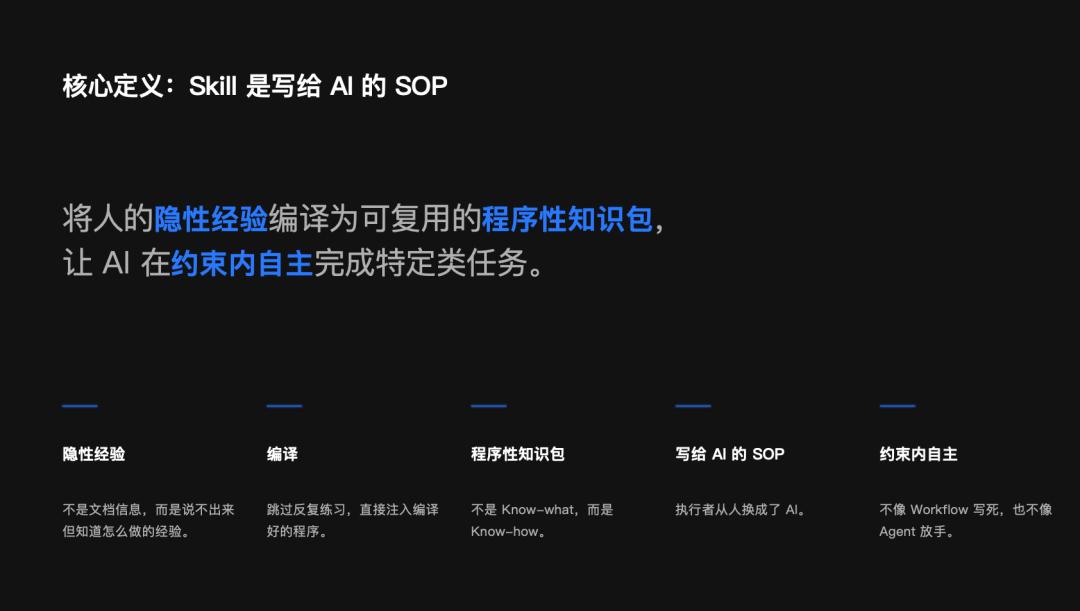
In conclusion, Skill is a Standard Operating Procedure (SOP) written for AI. More specifically, Skill compiles implicit human experiences into reusable procedural knowledge packages, allowing AI to autonomously complete specific tasks within constraints.
Key terms in this definition include “implicit experience,” which refers to knowledge that is not documented but is understood intuitively. “Compilation” means directly injecting this experience into AI, bypassing repetitive practice. “Autonomy within constraints” indicates that Skill does not rigidly define every step like a Workflow, nor does it completely relinquish control like an Agent; instead, it provides AI with flexibility within defined guidelines.

Theoretical Support: How Does Knowledge Become Skill?
This concept is supported by a classic cognitive psychology theory: ACT-R (Anderson, 1982). It categorizes human knowledge into two types:
- Declarative knowledge, or Know-what—facts and information (e.g., I know the button color is #2196F3, and spacing should use an 8px grid).
- Procedural knowledge, or Know-how—abilities to perform tasks without conscious thought (e.g., I know how to draw based on requirements without thinking about colors).
The transformation from the first type to the second is called “knowledge compilation.” Humans typically require repetitive practice to achieve this, but Skill injects the compiled results directly into AI, allowing it to skip the practice phase and gain the ability to “do.”
In summary: Knowledge bases allow AI to “know,” while Skills enable AI to “do.”
Evolution of Sharing Forms
Reflecting on the past few years of sharing trends in the AI community reveals a clear evolution:
Initially, people shared Prompts—“teaching you a spell.” Then, knowledge bases emerged—“giving you a book.” Now, there is a growing trend to share Skills—“giving you a skill.” In the future, we may even share Agents—“giving you an employee.”
Each step has deepened the nature of what is shared: from explicit knowledge to procedural knowledge, from “person-specific” to “consistent outcomes.”
Differences Between Skill and Other Concepts
During the sharing session, I used two quadrant diagrams to clarify the relationships between these concepts.
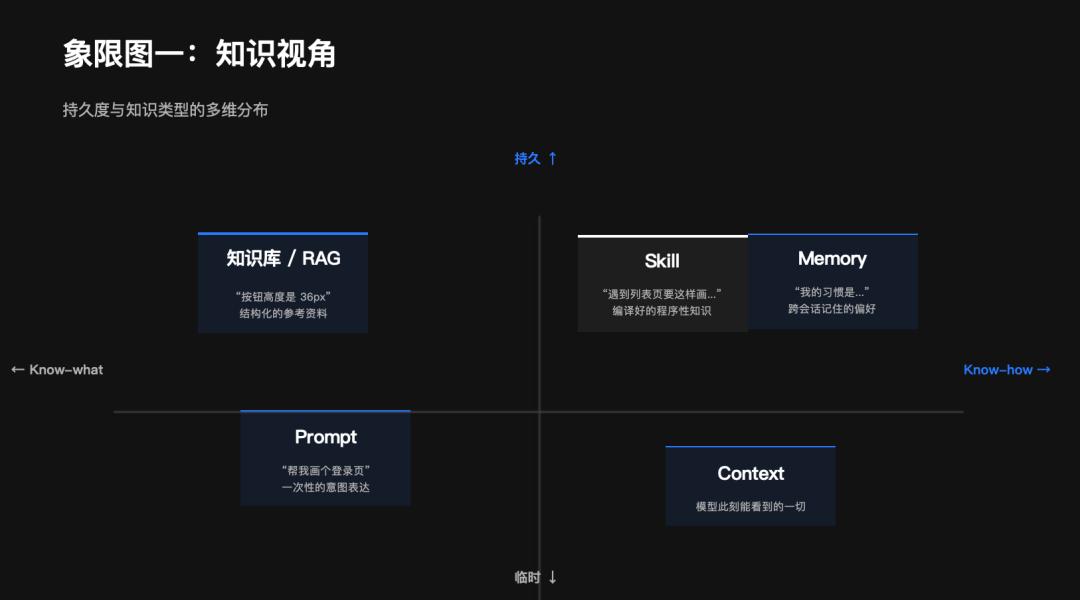
Knowledge Perspective Quadrant Diagram
The horizontal axis represents knowledge types, from Know-what to Know-how. The vertical axis indicates durability, from temporary to permanent.
- Prompt is temporary and leans towards Know-how (expressing intent).
- Context is a temporary information window.
- Knowledge bases are permanent Know-what.
- Memory records long-term preferences.
Skill occupies the upper right corner—permanent and Know-how. It consists of compiled procedural knowledge that does not disappear after a session.
Arrangement Perspective Quadrant Diagram
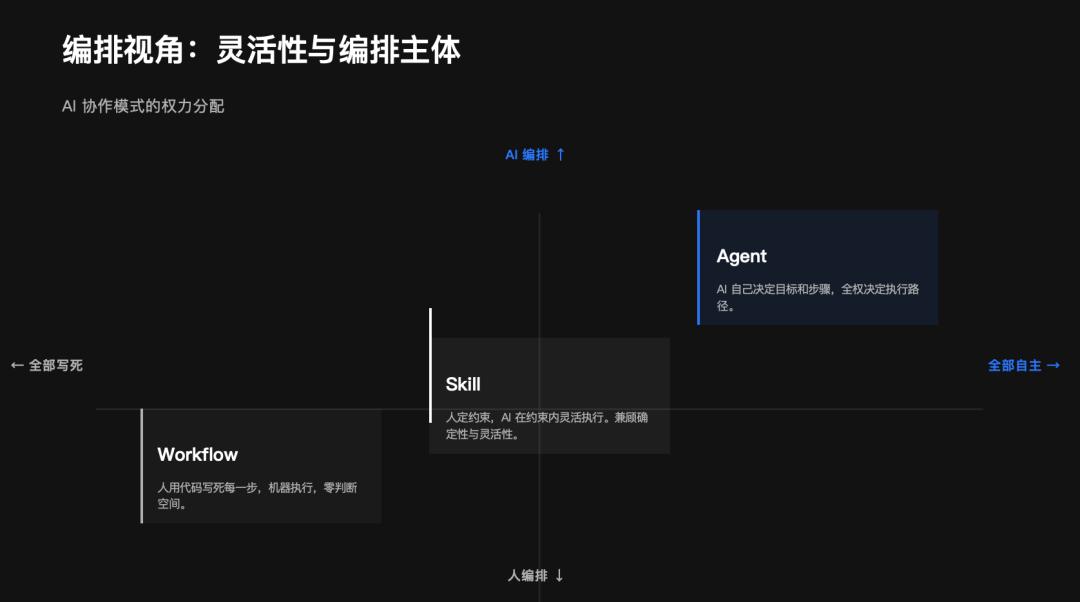
The horizontal axis represents the degree of specification, from fully defined to fully autonomous. The vertical axis represents the arranger, from human to AI.
- Workflow is in the lower left corner—humans write every step in code, and machines execute with zero judgment space.
- Agent is in the upper right corner—AI decides goals and steps independently.
Skill is positioned in the middle—humans set constraints, and AI executes flexibly within those constraints. This is its sweet spot.
Architectural Layers
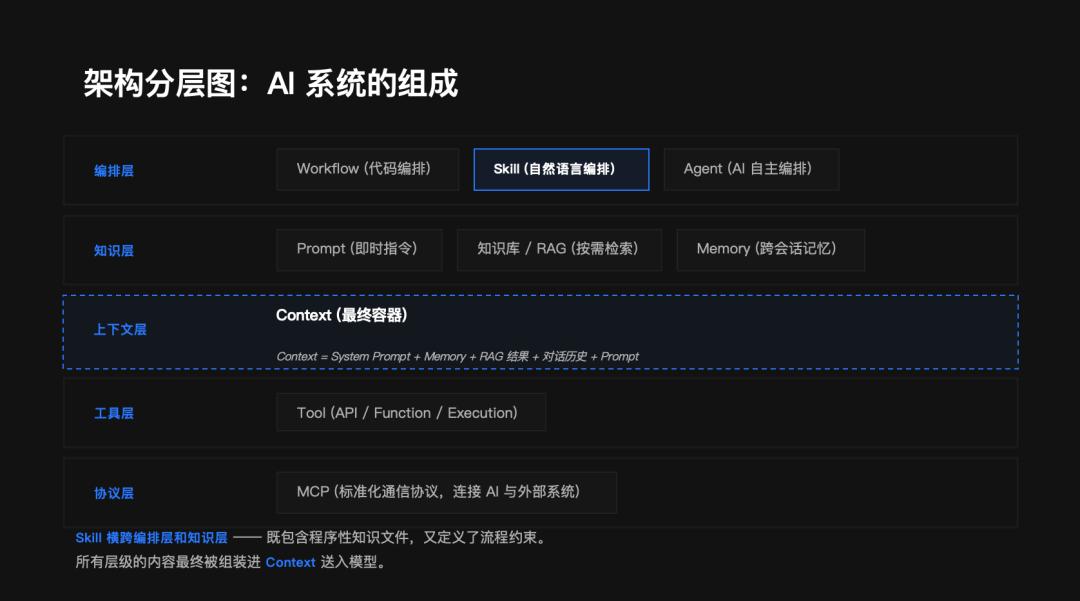
From bottom to top, the entire AI collaboration system can be divided into five layers: Protocol Layer (MCP), Tool Layer, Context Layer, Knowledge Layer (Prompt / Knowledge Base / Memory), and Arrangement Layer (Workflow / Skill / Agent).
Skill is unique because it spans both the Arrangement Layer and the Knowledge Layer—it includes knowledge documents (color specifications, Token tables), arrangement logic (5-step generation process), and constraint rules (lessons learned). It is not merely knowledge or a process; it is a combination of both.
How I Built My Figma Prototype Skill
Now, let’s discuss the practical aspect. I needed AI to help me create Figma prototype designs, progressing from unusable to functional through four stages.
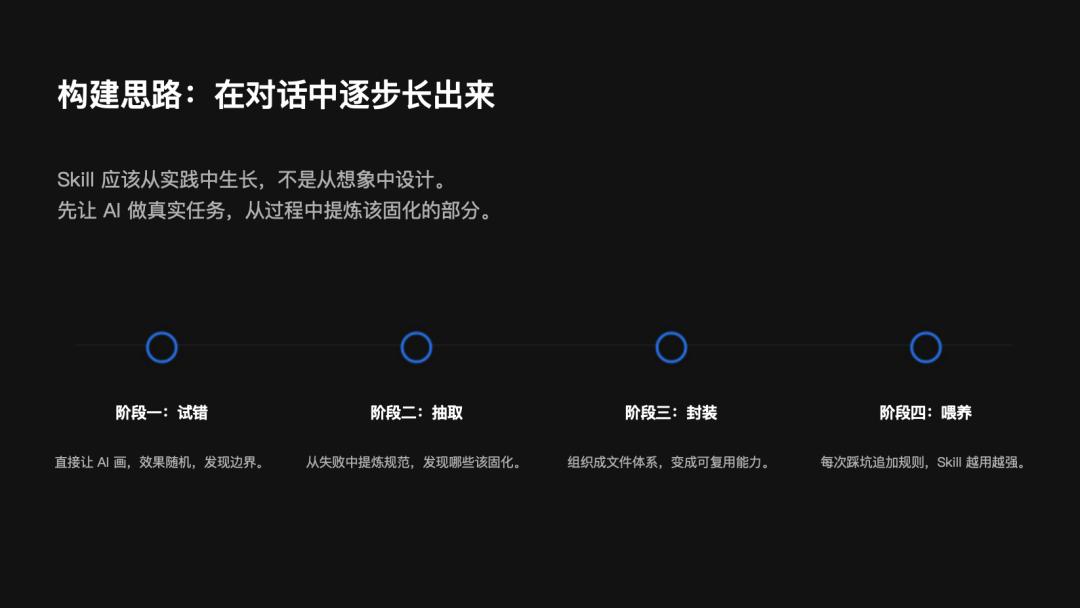
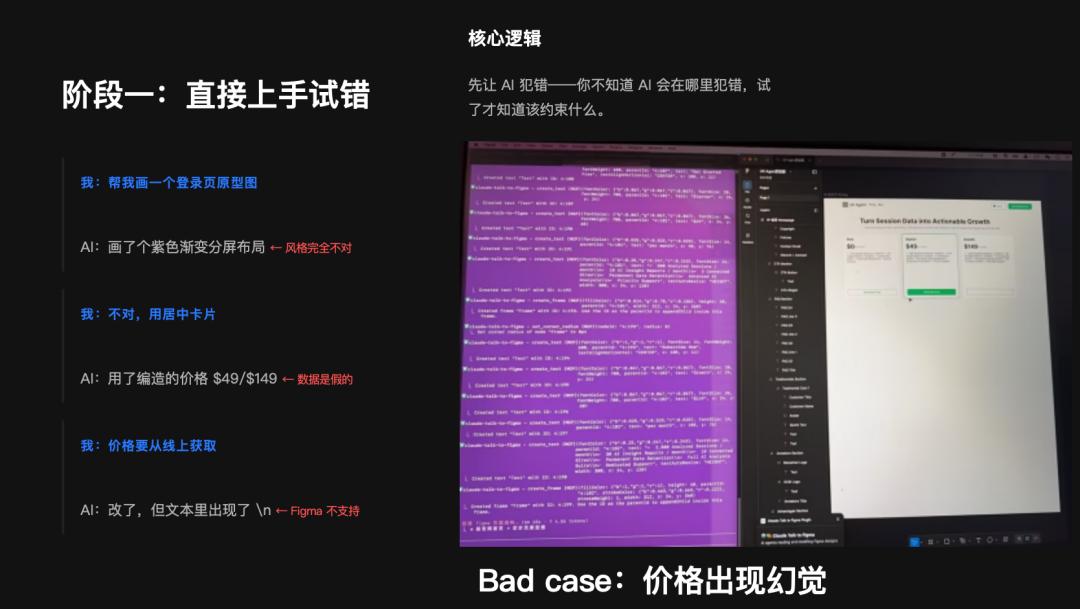
Stage 1: Direct Trial and Error
Initially, I wrote no specifications and simply told AI: “Help me draw a login page prototype.” The result was a purple gradient split-screen layout—completely off style. I corrected it, asking for a centered card. It changed it but fabricated prices of $49/$149—data that was incorrect. I insisted that prices should be sourced online. It adjusted, but the text included an unsupported character ’n’—Figma does not support that line break.
After five or six rounds of revisions, I learned that the value of this stage was in discovering where AI would make mistakes, informing what constraints to set.
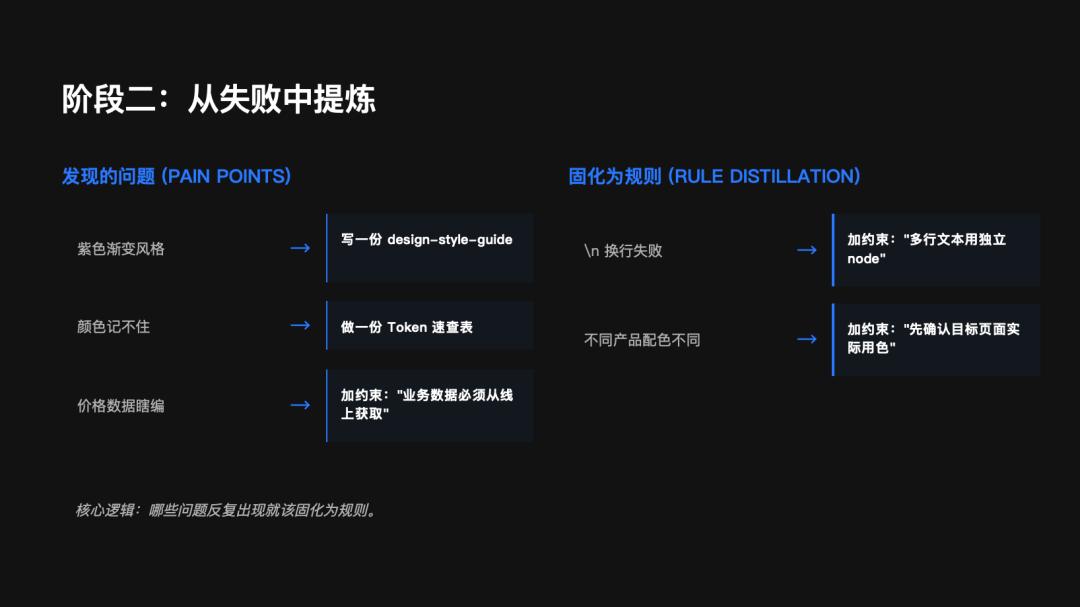
Stage 2: Extracting Lessons from Failures
After several rounds of practical use, I identified recurring issues: incorrect style, color memory failures, fabricated data, incorrect line breaks, and inconsistent product color schemes.
I documented these issues into rules: creating a design-style-guide, a Token reference table, and constraints like “business data must be sourced online” and “multi-line text should use independent nodes.”
The core action in this stage is to solidify recurring problems into rules.
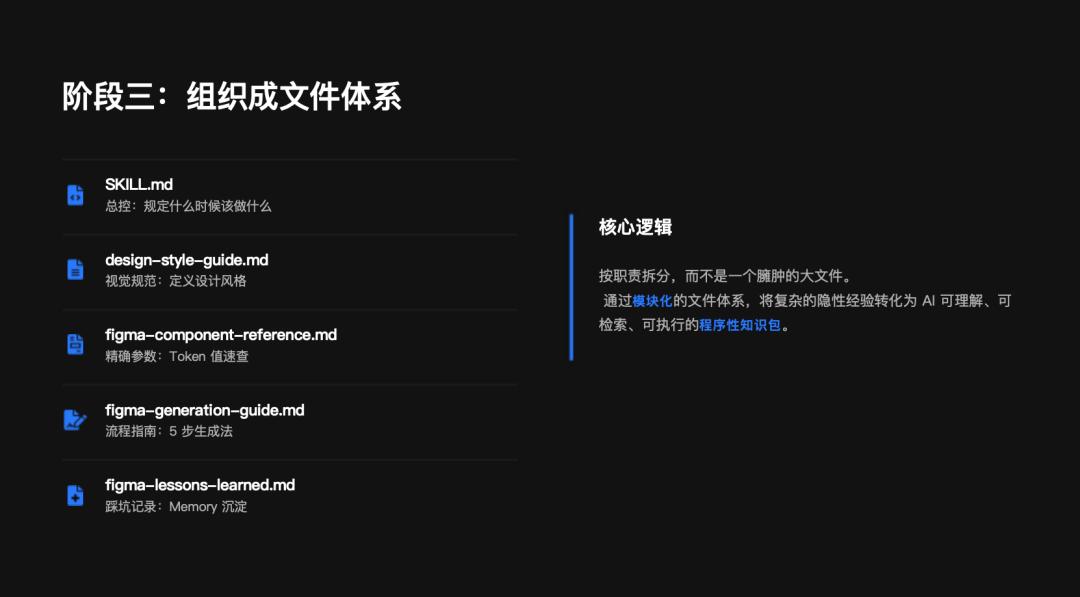
Stage 3: Organizing into a Document System
As the number of scattered rules increased, I organized them into a structured document system:
- SKILL.md is the master control document, outlining when to do what.
- design-style-guide.md contains visual specifications.
- figma-component-reference.md lists precise Token values.
- figma-generation-guide.md details the 5-step generation process.
- lessons-learned.md records pitfalls and is permanently stored in Memory.
The key is not to cram everything into one file but to split them by responsibility—just as human knowledge is layered, with methodologies in mind and details in manuals.
Stage 4: Continuous Feeding
Skill is not a one-time task. Each time I encounter new scenarios and issues, I immediately add rules. It functions like a continuously learning system, becoming stronger with use.
Six Techniques for Efficient Skill Building
In this process, I summarized several techniques to enhance Skill construction efficiency:
-
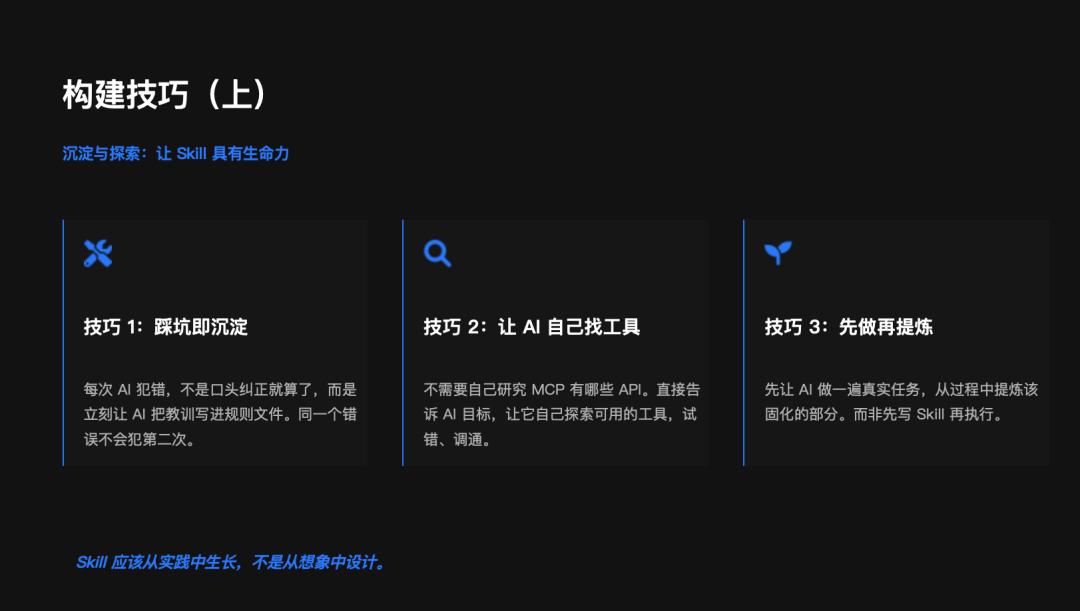
Learn from Mistakes: Each time AI makes an error, instead of just verbally correcting it, I immediately have AI document the lesson in the rules file. For instance, regarding the fabricated price data, I instruct, “Help me write this into lessons-learned,” and AI automatically adds it to the file. The same mistake won’t happen again.
-
Let AI Find Tools: I don’t research which APIs Figma MCP has. I simply tell AI my goal and let it explore available tools, testing and debugging. This saves a lot of time on documentation and helps AI form a first-hand understanding of tool capabilities.
-
Execute Before Refining Skill: Many people instinctively plan the Skill before execution. However, it is often more efficient to let AI perform a real task first and then extract what should be solidified. Skills should grow from practice, not be designed from imagination.
-
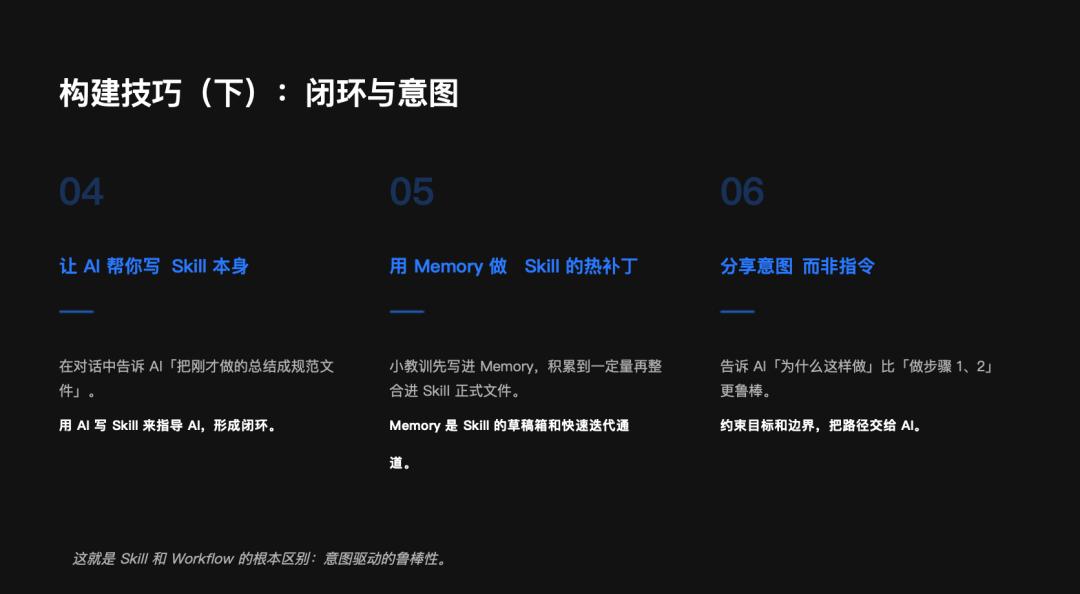
Have AI Write the Skill Itself: Instead of manually writing every specification, I tell AI during our conversation, “Summarize what we just did into a specification document.” Using AI to write Skills to guide AI creates a closed loop.
-
Use Memory as a ‘Hot Patch’ for Skill: Not every mistake requires a change in the main Skill file. Minor lessons can be documented in Memory first, and once a certain amount accumulates, they can be integrated into the formal Skill document. Memory serves as a draft box and rapid iteration channel for Skill.
-
Share Intent Rather Than Instructions: Avoid trying to dictate every step of AI’s operations. Communicating “why to do it this way” is more robust than “do step 1, step 2.” Set constraints on goals and boundaries, allowing AI to determine the path—this is the fundamental difference between Skill and Workflow.
Future Thoughts: What’s Next for External Tools?
Finally, let’s discuss the future.
Looking back, we have been layering different forms of “external tools” on top of general large models: first, external prompts—telling it what to do; then, external knowledge bases—informing it what to know; and now, external Skills—teaching it how to do.
Each step has delved deeper into the essence of what is shared. So, what’s next?
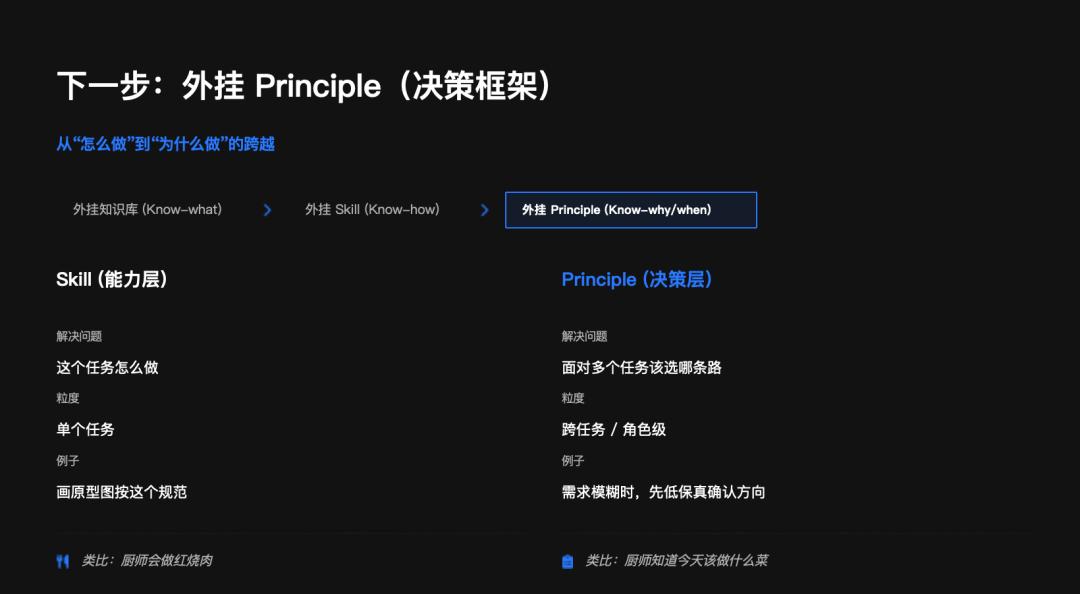
Next Step: External Principle (Decision Framework)
Continuing along the lines of ACT-R theory, after procedural knowledge comes automation and metacognition—not just “how to do something,” but “how to judge which task to undertake.”
Skill addresses “how to perform this task,” while Principle aims to resolve “which path to choose among multiple tasks.” For example, Skill is like a chef who knows how to make braised pork, while Principle is the chef who knows what dish to prepare today—considering ingredients, guests, and occasions.
From Skill Market to Role Market
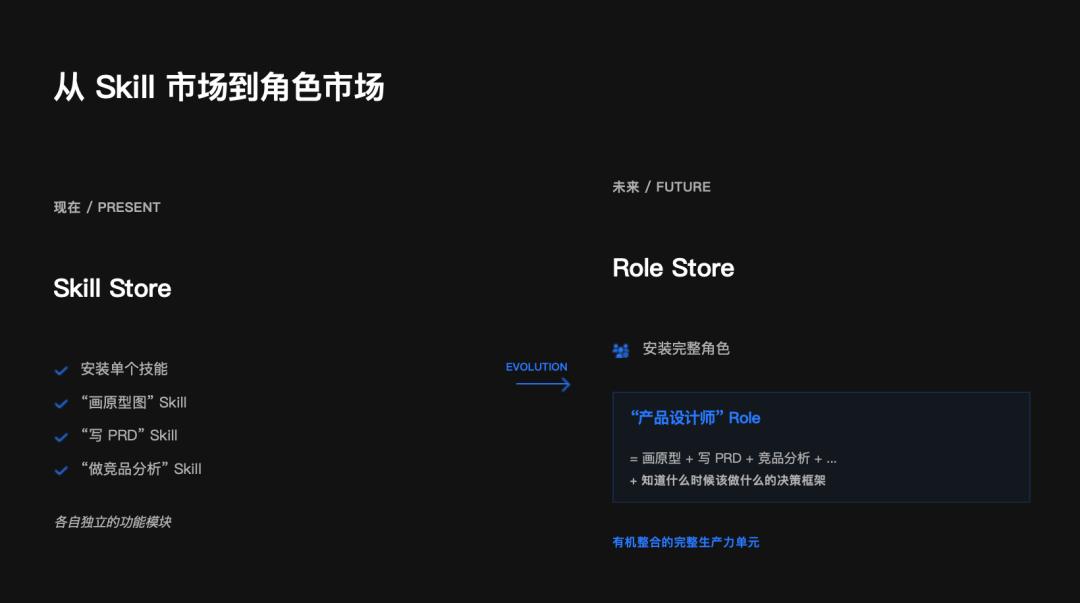
Skill marketplaces like SkillHub and ClawHub are emerging, reminiscent of the early App Store—distributing individual capabilities.
Once the Principle layer matures, the next step will be the emergence of an “AI Role Market”—where you no longer install individual skills, but complete professional roles. For instance, a “Product Designer” role could come pre-loaded with skills for prototyping, writing PRDs, conducting competitive analysis, and a decision framework for determining which Skill to use in which scenario.
Conclusion
From external prompts to external knowledge bases, we have enabled AI to know more.
From external knowledge bases to external Skills, we have enhanced AI’s capabilities.
The next step, from external Skills to external decision principles, will allow AI to make better judgments.
We are witnessing the evolution of AI collaboration from “sharing information” to “sharing capabilities,” ultimately leading to the “free flow of capabilities.”
Comments
Discussion is powered by Giscus (GitHub Discussions). Add
repo,repoID,category, andcategoryIDunder[params.comments.giscus]inhugo.tomlusing the values from the Giscus setup tool.